MCP Protocol Explained: How AI Agents Connect to Everything
Mathew Munyao
Founder, Arttention Media
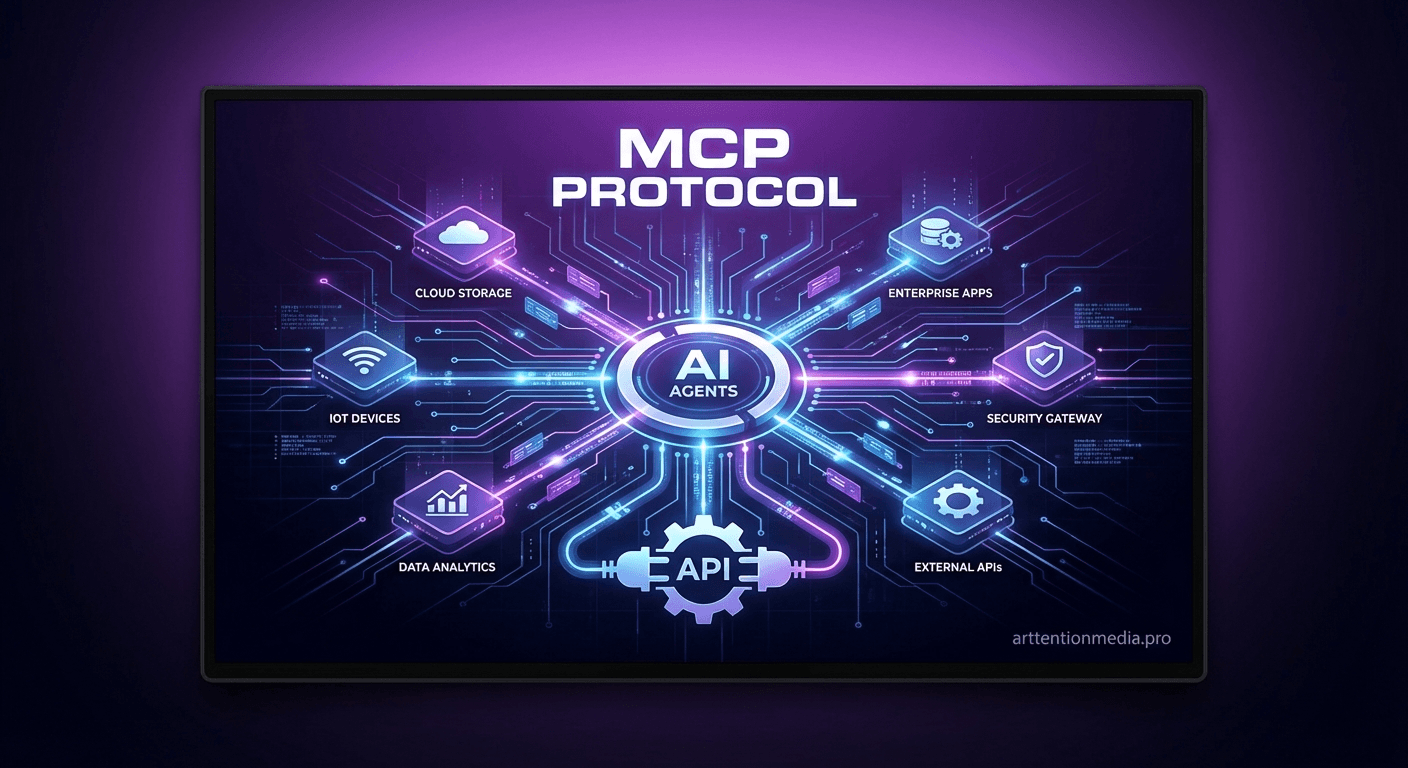
The Model Context Protocol is revolutionizing how AI agents interact with business systems. While most people still think of AI as isolated chatbots, MCP enables agents to connect directly to databases, APIs, calendars, email systems, and any other business tool. This isn't a theoretical future — it's the infrastructure powering the most sophisticated AI business automations today.
Understanding MCP is crucial for business leaders who want to deploy AI agents effectively. It's the difference between AI that can only chat and AI that can actually perform work within your existing business systems. We'll break down what MCP is, why it matters, and how businesses are using it to build AI agents that integrate seamlessly with their operations.
What is the Model Context Protocol?
MCP is a standardized way for AI agents to connect to external tools and data sources. Think of it as a universal translator that allows AI models to communicate with databases, APIs, file systems, and applications using a common language.
Before MCP, each AI integration required custom development. Connecting an AI agent to your CRM meant building specific code for that CRM. Adding calendar access meant another custom integration. Accessing your inventory system meant yet another separate project. This approach was expensive, fragile, and limited.
MCP standardizes these connections. An AI agent can use MCP to connect to hundreds of different systems using the same protocol. It's like having a universal power adapter for AI integrations — one standard that works with everything.
How MCP Actually Works
MCP defines three core components: resources, tools, and prompts. Resources are data sources the AI can access — customer records, product catalogs, email threads, calendar events. Tools are actions the AI can perform — sending emails, updating records, creating appointments, processing payments. Prompts are reusable instructions that guide the AI's behavior with specific systems.
When an AI agent needs to check a customer's order status, it uses MCP to connect to your e-commerce system, query the order database, and retrieve the information. When it needs to schedule a follow-up call, it uses MCP to access your calendar system, check availability, and create the appointment. All through the same standardized protocol.
The protocol handles authentication, data formatting, error handling, and connection management automatically. Business owners don't need to understand the technical details — they just need to know that MCP makes AI agents dramatically more capable and easier to integrate.
Why MCP Changes Everything for Business AI
The impact of MCP on business AI is similar to what APIs did for web development or what SQL did for databases. It creates a standard that unlocks exponentially more possibilities while reducing complexity and cost.
Pre-MCP, deploying an AI agent meant months of custom development to connect to your existing systems. Post-MCP, the same integrations can be configured in days or weeks. The AI agent can access all your business data and perform actions across multiple systems from day one.
This standardization also means AI agents become more intelligent over time. Instead of being limited to the specific systems they were built to integrate with, MCP-enabled agents can leverage new connections and capabilities as they become available.
Real-World MCP Applications
Businesses are using MCP to build AI agents that operate across their entire tech stack. A customer service agent can access CRM records, order history, product catalogs, and support documentation simultaneously. A sales agent can qualify leads, check inventory, update forecasts, and schedule appointments within a single conversation.
- Customer support agents accessing CRM, ticketing, and knowledge bases
- Sales agents integrating with lead sources, calendars, and quote systems
- Marketing agents connecting to social platforms, email tools, and analytics
- Operations agents working with inventory, shipping, and accounting systems
- HR agents accessing employee databases, calendars, and communication tools
The power isn't just in individual connections but in the orchestration. An AI agent can take a complex business process that normally requires multiple systems and manual handoffs and execute it automatically. A new customer inquiry can trigger lead qualification, system access checks, appointment scheduling, and follow-up email sequences without any human intervention.
MCP vs Traditional Integration Approaches
Traditional AI integrations require point-to-point connections between the AI system and each external tool. This creates a web of custom code that becomes increasingly difficult to maintain and expand. Each new integration means more custom development, testing, and ongoing maintenance.
MCP replaces this with a hub-and-spoke model where the AI agent connects to MCP servers that handle the integration complexity. Adding new capabilities means configuring MCP servers, not developing custom integration code. The result is faster implementation, lower costs, and more reliable connections.
The maintenance burden also decreases dramatically. When a CRM updates its API, the MCP server handles the changes without requiring updates to the AI agent. When new business systems are added, they connect through MCP without modifying existing integrations.
Building MCP-Enabled AI Agents
Implementing MCP in business AI systems follows a specific architecture pattern. MCP servers act as intermediaries between AI agents and business systems. These servers handle authentication, data transformation, and system-specific logic while presenting a standardized interface to the AI agent.
Popular MCP servers already exist for major business platforms: Salesforce, HubSpot, Google Workspace, Microsoft 365, Shopify, QuickBooks, and hundreds of others. Custom MCP servers can be built for proprietary systems or unique business requirements.
The AI agent configuration defines which MCP servers it can access and what permissions it has for each system. This creates clear boundaries around what the AI can and cannot do while enabling powerful cross-system workflows.
Security and Access Control with MCP
MCP includes built-in security features that are crucial for business applications. Access controls define exactly what data and functions each AI agent can access. Audit logging tracks all AI actions across connected systems. Data encryption protects information in transit and at rest.
The protocol supports role-based access control, so different AI agents can have different permissions based on their function. A customer service agent might have read access to customer records but not financial data. A sales agent might be able to create quotes but not process payments.
MCP also enables granular monitoring and control over AI agent behavior. Business owners can see exactly what systems their AI agents are accessing, what actions they're performing, and what data they're using to make decisions. This transparency is essential for business compliance and risk management.
The MCP Ecosystem
The MCP ecosystem is growing rapidly as more businesses recognize the value of standardized AI integrations. Major AI providers are building MCP support into their platforms. Software vendors are creating MCP servers for their products. System integrators are offering MCP-based AI solutions.
This ecosystem effect means businesses get access to an expanding universe of AI capabilities without additional development. As new MCP servers become available, existing AI agents can leverage them immediately. The network effects make each business's AI investment more valuable over time.
Open source MCP implementations are accelerating adoption by making it easier for developers and businesses to experiment with and deploy MCP-enabled AI agents. The barrier to entry continues to decrease while capabilities expand.
Implementation Considerations for Businesses
Businesses planning to deploy MCP-enabled AI agents should start by mapping their existing systems and identifying the most valuable integration opportunities. Not every system needs AI access immediately — focus on the connections that will deliver the highest impact.
Data quality and system documentation become more important with MCP implementations. The AI agent is only as good as the data it can access and the accuracy of that data. Clean, well-organized business systems enable more capable AI agents.
Staff training should cover how to work with MCP-enabled AI agents effectively. Teams need to understand what the agents can do, when to let them work autonomously, and when to intervene. The most successful implementations include clear guidelines about AI agent responsibilities and escalation procedures.
The Future of Business AI with MCP
MCP is enabling a new generation of AI agents that operate more like business employees than chatbots. These agents have access to all the information and tools they need to complete complex workflows autonomously.
We're moving toward AI agents that can handle entire business processes from start to finish. Customer onboarding, order fulfillment, support escalation, financial reporting — all managed by AI agents with deep integration into business systems through MCP.
The businesses that understand and implement MCP early will have significant competitive advantages as AI capabilities continue to expand. They'll be able to deploy more sophisticated AI agents faster and integrate new capabilities as they become available.
MCP transformed our AI implementation from a six-month custom development project to a three-week configuration. Our agents now have access to every system they need and we can add new capabilities in days.
FAQ
Is MCP secure enough for business-critical systems?
Yes, MCP includes enterprise-grade security features including encryption, access controls, and audit logging. Many businesses are using MCP for production systems handling sensitive customer and financial data.
Do we need to change our existing business systems to use MCP?
No, MCP works with existing systems through standard APIs and connections. MCP servers act as adapters that translate between your current systems and the AI agents without requiring system changes.
How long does it take to implement MCP-enabled AI agents?
Implementation time depends on the complexity of integrations, but MCP significantly reduces development time compared to custom solutions. Simple implementations can be completed in 2-4 weeks, while complex multi-system integrations typically take 6-8 weeks.
What happens if an MCP server goes down?
MCP implementations include failover and error handling mechanisms. AI agents can be configured to gracefully handle temporary connection issues and alert administrators when systems become unavailable.
Can MCP work with legacy business systems?
Yes, MCP servers can be built to connect with legacy systems through available interfaces like databases, file exports, or existing APIs. This makes it possible to bring AI capabilities to older business systems.
Take it further with Arttention Media
Explore the services behind the ideas in this article:
Mathew Munyao
Founder, Arttention Media
Mathew Munyao is the founder of Arttention Media. The studio publishes this site and builds websites, AI agents, and automation for service businesses.
Ready to grow your business?
Book a free consultation — no pressure, just honest advice about what will work for your industry.
Book a Free Consultation →